A frequently asked multiple-column layout question is why a new paragraph at the start of the column has additional space above it.
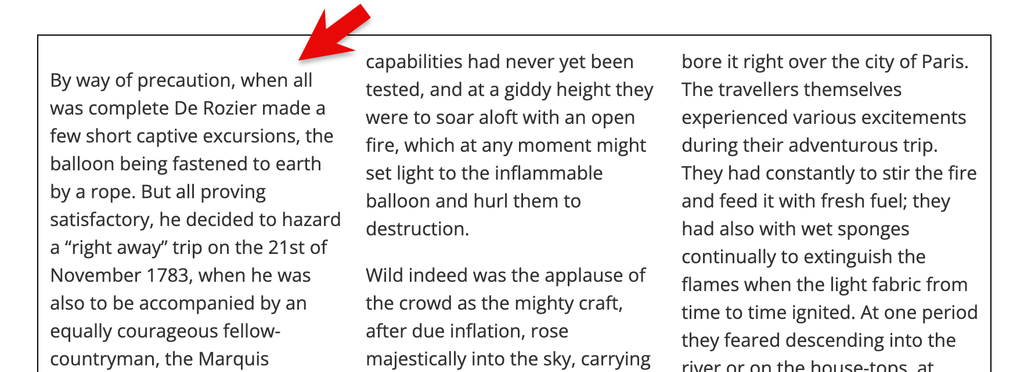
The space is the margin on the paragraph, which doesn’t collapse if the paragraph is inside a multicol container. The only fix is to not use a top margin on paragraphs.
However, the new margin-trim CSS property solves this problem. From Chrome 155 applying margin-trim: block-start to the multicol container will trim the margin on any element at the start of the container. You can see it working in this CodePen demo, using Chrome 155.

Safari has supported the margin-trim property on block elements since Safari 16.4, however it doesn’t support the property for multicol. Due to this partial implementation using feature queries to test support for margin-trim in multicol isn’t possible. In the linked CodePen, I use feature queries to test for margin-trim: block-start, and show a message to alert the viewer if their browser doesn’t have support. While Safari won’t show that message, the trimming of the top margin fails due to lack of support in multicol.
There are lots of useful applications for margin-trim in block layout. You can see some of these in the WebKit post Easier layout with margin-trim. I’m hopeful we’ll see this implemented everywhere for multicol soon, and I’ll finally have a good answer to one of the questions I get asked about multicol!
1 Comment
Good to finally have a proper fix for the extra space above a paragraph that starts a new column, instead of stripping top margins everywhere. The detail that Safari supports margin-trim on block containers but not in multicol, so a feature query passes while the trim silently fails, is exactly the kind of gotcha that would cost me an afternoon. Has there been any CSSWG discussion about letting @supports test a property per layout type, or is that out of scope?
Mentions
Likes
Reposts